PF Printer
PF Printer PDF - Batch Print to PDF
Automate your drawing exports and save hours of manual work. PF Printer PDF is a powerful Autodesk® Revit® plugin that lets you batch print, publish, or export multiple sheets to PDF with a single click. The plugin automatically detects and applies the exact paper size for each individual sheet, fully supporting both standard and custom formats. Whether you need separate PDF files with customizable naming rules or a single merged multi-page document, this tool ensures fast, precise, and effortless publishing of your entire project documentation.
Create an account to download your free trial.
PF Printer PDF - Batch Print to PDF
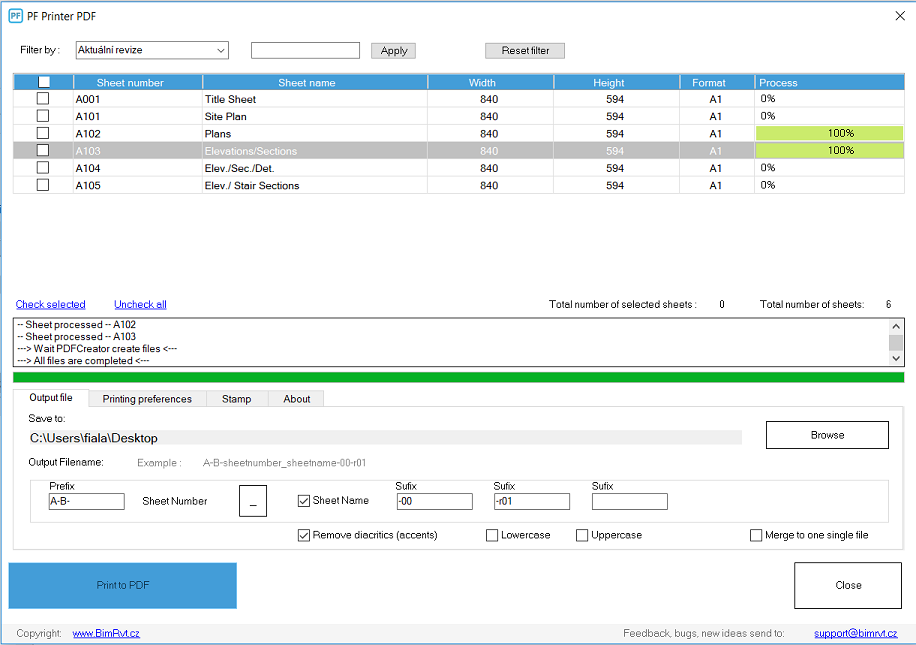
Easily publish your work to PDF in just seconds. Batch print, publish, or export multiple sheets to PDF with varying paper sizes. Just one click, completely automated. Plotting your sheets is effortless with the PF Printer for Autodesk® Revit®.
The plugin automatically detects and sets the paper size to match the sheet size. Both standard and custom paper sizes are fully supported. Simply select your sheets from a list, define the output filename, and choose the destination directory. You can choose between black & white or color printing modes, and even adjust a scale parameter to uniformly resize the drawing and paper.
General Features
- Publish sheets to PDF
- Option to merge all selected sheets into a single PDF file
- Automatically remove diacritics / accents from sheet names
- Convert output filenames to lowercase or uppercase
- Set custom prefixes and suffixes for output filenames
- Automatic PDF paper size matching the Revit sheet (standard and custom sizes supported)
- Black/white or color printing modes
- Custom print scaling (%) for both sheet and paper size
- Vector or Raster processing options
- Standard Revit print settings (Hide unreferenced view tags, Hide scope boxes, etc.)
- Custom stamp options (text, color, size)
New Features
- New: Alphanumeric sorting of the sheet list
- New: Sheet list filtering
- New: Drag and drop functionality to easily reorder sheets
- New: Custom output filename definition when merging into a single PDF
- New: Automatically saves your last used settings when closed
- New: File existence check (automatically adds a suffix to prevent overwriting existing files)
- New: Simplified installation and activation process
Enhancements
- Enhanced: Improved folder dialog for destination directory selection
- Enhanced: New, significantly faster PF Printer core engine
- Enhanced: Post-process verification to ensure files were successfully created
- Enhanced: Modernized user interface (UI)
Fixes
- Fixed: Resolved an issue where the default printer driver was not set to PDFCreator
- Fixed: Resolved a bug causing incorrect filenames during lengthy print processes
- Fixed: Improved overall stability during large batch print jobs
- Fixed: Corrected PDF page orientation when merging multiple sheets into a single file